


Are you looking for information on how to search spaces on X?
You’ve come to the right place. At Owlead, we provide you with a detailed guide, including step-by-step instructions on how to search for this type of listening and virtual meeting format on the X platform.
We will show you how to navigate the platform, filter your searches, and make the most of the available tools to connect with other users. Whether you’re looking for informational meetings, discussions, or networking sessions, we’ll help you find exactly what you need effectively.
Shall we start?
PS: This feature is available only on the mobile app.
Step 1: Click on your profile pic and choose the “Spaces” option in the menu
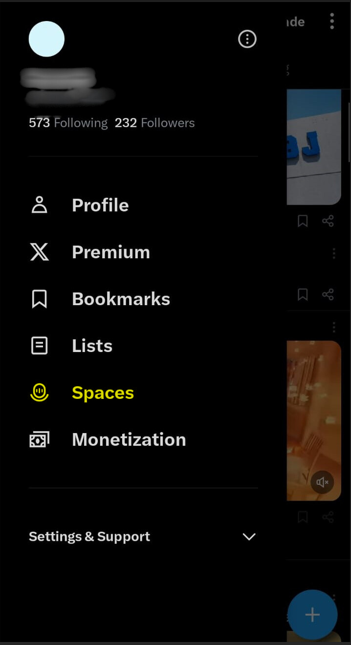
Step 2: This will take you to all the Spaces happening right now, some of them trending. Slide to view other ones.

Step 3: Click the one you’d like to join and select “Got it” at the bottom
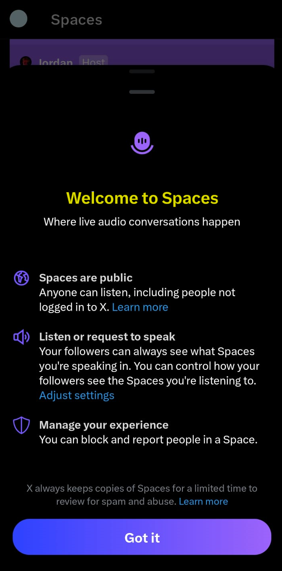
Step 4: Then you’ll join as a listener when you click on “start listening”

Step 5: You can chat, or ask to speak with the logos at the bottom right of your screen. You can leave at the red button upper right also.

Thank you for taking the time to read our guide on finding Spaces on X. We hope this step-by-step walkthrough, along with the accompanying images, proves useful for you as you explore the exciting world of live audio conversations.
If you have any questions or suggestions, feel free to reach out. Happy listening, and we look forward to seeing you in a Space soon!