


Wanna know how to mute words on X? keep reading.
Social media platforms have become an integral part of our daily lives, with X (formerly known as Twitter) being no exception.
However, with the constant flow of information and conversations, it’s easy to feel overwhelmed by content that might not interest you or that you simply prefer to avoid. One effective way to manage what you see in your feed is by using the word-muting feature.
In this step-by-step guide, we’ll walk you through how to mute specific words on X, allowing you to tailor your experience on the platform and keep your timeline focused on what truly matters to you.
PS: Follow the yellow marked options in every step to make sure you’re doing the right thing 👍
Let’s start with this guide to help you out!
Step 1: Click on “More” at the end of the menu

Step 2: Click on “Settings and privacy” marked in yellow

Step 3: Once you are there select the “privacy and safety” option on the settings

Step 4: Go to “mute and block”
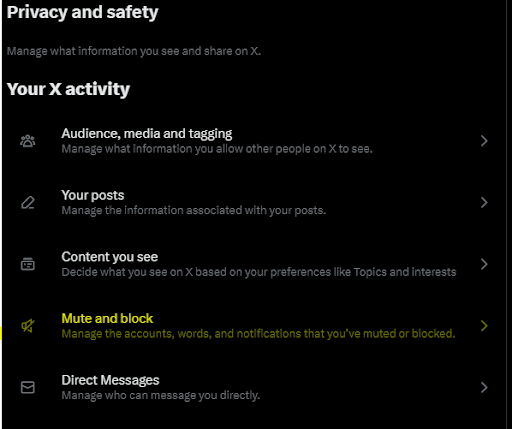
Step 5: Follow to “muted words” to continue

Step 6: At this stage, the words you’ve muted will appear here, and add some on the “+” symbol at the top right of your screen.

Step 7: Write the word you want to mute, “Game of Thrones” for example not to suffer any spoilers. 😂

Step 8: Then you can specify which type of muted to select. Can be on the timeline, notifications, from a specific account, and the time (it can be forever).
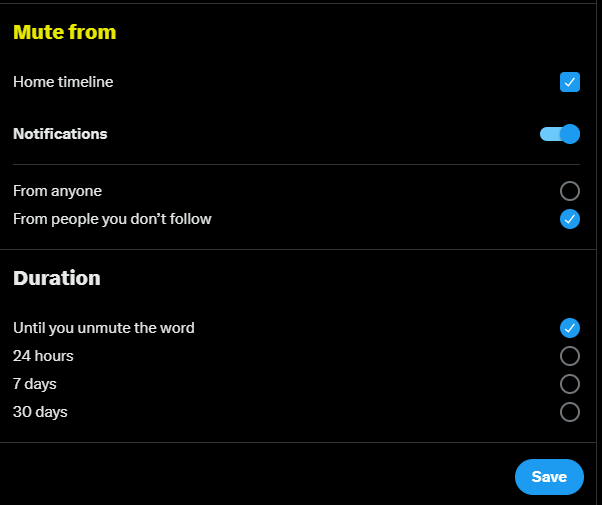
Click on “save” and enjoy X as you like.
In conclusion, we hope this step-by-step made a huge difference in how you’re enjoying X, and we solved what you were looking for.
If you are wondering How to remove content warning on X or How to remove followers on X visit each link 😀