


If you’re wondering how to delete an X account, this is the place to be.
As digital platforms continue to evolve, maintaining control over your online identity becomes increasingly important. Whether you’re seeking a temporary pause or permanently deleting your X account, it’s crucial to understand the process thoroughly.
At Owlead, we aim to empower you with the knowledge needed to manage your online accounts effectively. In this article, we’ll provide a clear, step-by-step guide on deleting your X account, highlighting key considerations, and offering tips to make the process as easy as possible to take down the account in case you want to.
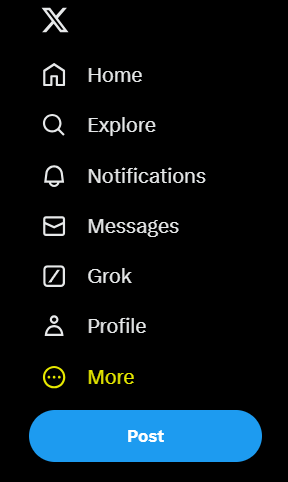
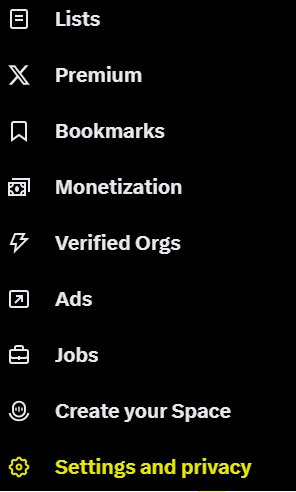
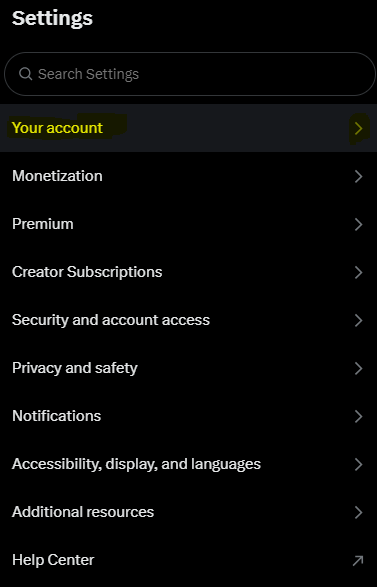
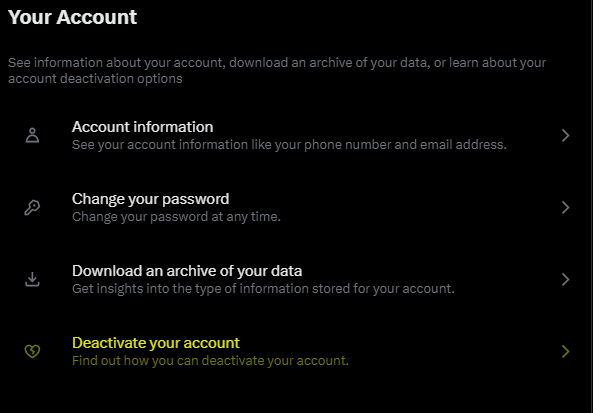
Follow the yellow-marked options in each step
Let´s get into this!
Step 1: As most of these types of actions, well dive into the “more” option marked below.
Step 2: Then just click on the bottom on “settings and privacy”.
Step 3: Once you’re on the settings menu, select the first one “your account”.
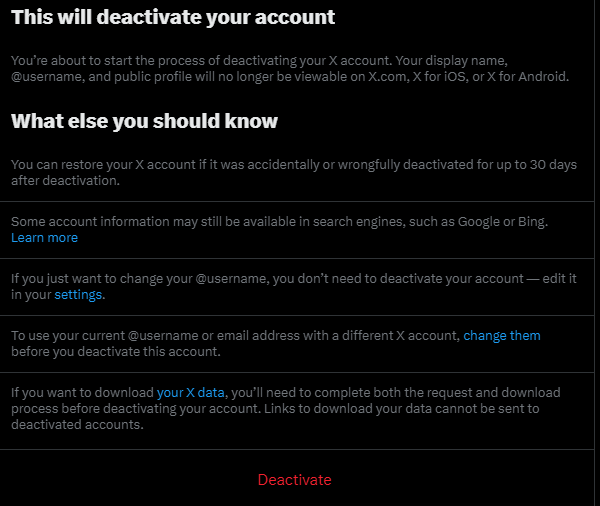
Step 4: Then you will choose the “Deactivate your account” option to continue with this process.
Step 5: To finish this, click on the “deactivate” red button at the bottom. Note that if you don’t log back in within 30 days, your account will be permanently deleted.
Hopefully, this step-by-step guide will help through this deactivation or deleting decision that you’ve decided to make with your own X account.
If you encounter any issues or have further questions, don’t hesitate to revisit the images and instructions provided in this article. Each visual guide is designed to assist you at every stage of the process, ensuring that you have all the tools you need.